Facebook
 Twitter
stefan-franz
Basic Pleskian
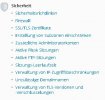
Hallo, i can't find the settings to adjust brute force attacks, like here described. I don't have that option.

 docs.plesk.com
I use Plesk Obsidian 18.0.35 on Ubuntu 18.04.5 LTS at a virtual Server on strato.de
Where can i find it?
(Plesk for Linux) Protection Against Brute Force Attacks (Fail2Ban)
Fail2Ban is a IP address banning tool that protects your server and the hosted websites from brute-force attacks. It is an advanced tool disabled by default. Plesk also has a basic brute-force protection for logins. This basic protection is enabled by default.
docs.plesk.com
I use Plesk Obsidian 18.0.35 on Ubuntu 18.04.5 LTS at a virtual Server on strato.de
Where can i find it?