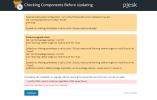
A ALAA_20 New Pleskian Jan 30, 2023 #1 Hello i got this problem, any help plz Attachments Plesk-Installer-2.png 63.8 KB · Views: 16
P Peter Debik Community Manager until 3/2024 Plesk Team Jan 30, 2023 #2 This could maybe result from a wrong Python version installed. What is the output of # python -V ?
A ALAA_20 New Pleskian Jan 31, 2023 #3 hello [root@epic-thompson ~]# python -V Python 3.6.8 [root@epic-thompson ~]#
P Peter Debik Community Manager until 3/2024 Plesk Team Jan 31, 2023 #4 The issue is likely caused by that Python version. Instead, create a symbolic link to the 2.x version that should also be on your system. 1) Ensure that Python 2.7.5 is installed Code: # rpm -q python-2.7.5 python-2.7.5-90.el7.x86_64 2) Proceed only if python 2.7 is found in step (1). Change the symlink from python3 to python 2.7. Code: # mv /bin/python{,.orig}; ln -s /bin/python2.7 /usr/bin/python 3) Retry yum as you did before.
The issue is likely caused by that Python version. Instead, create a symbolic link to the 2.x version that should also be on your system. 1) Ensure that Python 2.7.5 is installed Code: # rpm -q python-2.7.5 python-2.7.5-90.el7.x86_64 2) Proceed only if python 2.7 is found in step (1). Change the symlink from python3 to python 2.7. Code: # mv /bin/python{,.orig}; ln -s /bin/python2.7 /usr/bin/python 3) Retry yum as you did before.

 Facebook
 Twitter