Follow along with the video below to see how to install our site as a web app on your home screen.
Note: This feature may not be available in some browsers.
We value your experience with Plesk during 2025 Plesk strives to perform even better in 2026. To help us improve further, please answer a few questions about your experience with Plesk Obsidian 2025. Please take this short survey: https://survey.webpros.com/
It's set there, however I can still access the panel from any domain on the panel and in IIS the binding is currently set to all IP addresses and no hostname.
As InderS meant you can just go to Internet Information Services (IIS) Manager (found at C:\ProgramData\Microsoft\Windows\Start Menu\Programs\Administrative Tools)
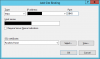
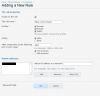
Expand your computer name and sites click PleskControlPanel then at the right side click Bindings... click add
You will know what to enter.
Of course don't forget to add a firewall rule if you use one and you should do that in the plesk control panel so it will remember in future.
After you have added the firewall rule restart your server to apply the changes.
These were done in Plesk 12. I also apologize if I replied to the wrong topic which is for 11.x but the way to set up is same compared to 12.x.

 Facebook
 Twitter