• We value your experience with Plesk during 2025
    Plesk strives to perform even better in 2026. To help us improve further, please answer a few questions about your experience with Plesk Obsidian 2025.
    Please take this short survey:

    https://survey.webpros.com/

Issue remove grafana by hand

wschoener

New Pleskian
Hi there,
some days before christmas grafana did not work any more. It did not show any graphics, but it show up a error.
So I tried to uninstall it, in the hope to reinstall it afterwards. The uninstallation did not work. I tried to uninstall it by using ssl, but this did not work either.
Grafana is still in Plesk but "Advanced Monitoring" doesnt show any information. When I call "extensions->myextensions-grafana->open" there is a white page and the title of the page is "server error".
Sometimes there is a message:
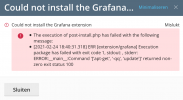
The execution off post-install.php failed. Error-message: [2021-01-14 08:30:42.808] ERR [extension/grafana] Execution package has failed with exit code 1, stdout: , stderr: ERROR:__main__:Command '['apt-get', '-qq', 'update']' returned non-zero exit status 100

So I would like to remove grafana by hand. How can I do this?
Thank you
Wolfgang
 
Have you tried to use a command like:

# dpkg -r --force-all grafana

?
 
Hi @IgorG & wschoener, I have the same error:

The execution off post-install.php failed. Error-message: [2021-01-14 08:30:42.808] ERR [extension/grafana] Execution package has failed with exit code 1, stdout: , stderr: ERROR:__main__:Command '['apt-get', '-qq', 'update']' returned non-zero exit status 100
And I tried to resolve it but with no success, I deleted grafana from the extensions menu and reinstalled it again but with no success, I was left with ^ error.

I tried Igor his # dpkg -r --force-all grafana But this also did not help since when I try to install it again, the same error pops up.
Any tips and should I use --Purge to make it all clean?
Kind regards!
 

Attachments

  • Shot 2021-02-22 om 18.37.40.png
    Shot 2021-02-22 om 18.37.40.png
    91.4 KB · Views: 9
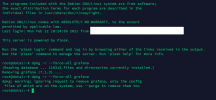
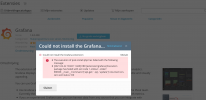
Oh, at this point without purging but stil after I tried # dpkg -r --force-all grafana, I now am not able to install grafana anymore as seen on screenshot 1.
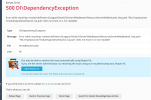
But when I checked into my extensions after a refresh, I see grafana in my extensions list. When clicking on it, it gives me the same error (screenshot 2) and I am stuck from here:D.
 

Attachments

  • 2.png
    2.png
    264.3 KB · Views: 13
  • 1.png
    1.png
    320.2 KB · Views: 12
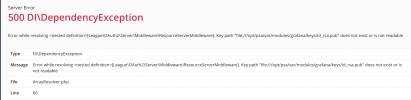
When I go to the advanced monitoring tab It gives this error so the directory never was made. When clicking fix this issue I will make the loop complete. Still no solution..
 

Attachments

  • Shot 2021-02-22 om 20.45.25.png
    Shot 2021-02-22 om 20.45.25.png
    58.5 KB · Views: 4
In the meantime I deleted and reinstalled Advanced monitoring to and that did work but after that the same grafana error came back..
I searched for the folder that is mentioned in the error and found out the whole Grafana folder is empty?
/opt/psa/var/modules/grafana shows no files.
 

Attachments

  • Shot 2021-02-22 om 22.34.27.png
    Shot 2021-02-22 om 22.34.27.png
    149.9 KB · Views: 5
After deleting advanced monitor and grafana for the 2352 time and waited a couple of days I get this error back again.
 

Attachments

  • Shot 2021-02-24 om 18.40.47.png
    Shot 2021-02-24 om 18.40.47.png
    93.3 KB · Views: 6
What is the output of command:

# netstat -ntpl | grep :3000

?
 
hi @IgorG Meanwhile deleted the (faultily installed) advanced monitor and grafana, dropped your command in the SHH and no output:(
 
Today I tried to reinstall Advanced monitoring again and hope it will take Grafana with it in the download but too bad.
It does give a clean new error to work with, any suggestions?
 

Attachments

  • Shot 2021-02-27 om 21.01.57.png
    Shot 2021-02-27 om 21.01.57.png
    111.9 KB · Views: 2
Updated debian 8 to 9 and tried all over again, still no success after following this topic and steps:

still getting this error time after time:

ERR [extension/grafana] The execution of post-install.php has failed with the following message:
[2021-03-03 18:54:13.671] ERR [extension/grafana] Execution package has failed with exit code 1, stdout: , stderr: ERROR:__main__:Command '['apt-get', '-qq', 'update']' returned non-zero exit status 100
The execution of post-install.php has failed with the following message:
[2021-03-03 18:54:13.671] ERR [extension/grafana] Execution package has failed with exit code 1, stdout: , stderr: ERROR:__main__:Command '['apt-get', '-qq', 'update']' returned non-zero exit status 100
 
I suppose that you have to contact the Plesk Support Team. Experienced support guys will check and fix the issue directly on your server.
 
Thanks for the reply @IgorG I'm running a couple of plesk licences @OVH how do I contact plesk, can I give my OVH-Plesk licence as a proof or must it be directly bought @ plesk? I use plesk for 4/5 years now and never had to contact support so I'm not sure how to do this.
 
Just a question? is your plesk panel running in a Debian 8 server?
One of mine has exactly the same problem, it has not been migrated to a new OS yet...
 
Back
Top