Follow along with the video below to see how to install our site as a web app on your home screen.
Note: This feature may not be available in some browsers.
We value your experience with Plesk during 2025 Plesk strives to perform even better in 2026. To help us improve further, please answer a few questions about your experience with Plesk Obsidian 2025. Please take this short survey: https://survey.webpros.com/
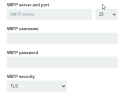
When you login from a script that is running on the same server, the SMTP server is localhost, port 25. The username is the name of your mailbox (the same like the email address), the password is the password of that mailbox. Security TLS is fine.
Are you the only user on that server? In that case for reasons of simplicity you can try to disable TLS. If that is not the case, the error can be caused by the "localhost" servername. Instead, try using the real domain name of the host that is protected with the host mail server SSL certificate.
You need to use the hostname, that is the one that is set in Tools & Settings > Server Settings > Full Hostname. Please also make sure in Tools & Settings > Security > SSL/TLS certificates that a "Certificate for securing mail" is selected.