Follow along with the video below to see how to install our site as a web app on your home screen.
Note: This feature may not be available in some browsers.
We value your experience with Plesk during 2025 Plesk strives to perform even better in 2026. To help us improve further, please answer a few questions about your experience with Plesk Obsidian 2025. Please take this short survey: https://survey.webpros.com/
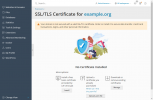
To avoid showing anything except Let's Encrypt, there are a few different ways:
- uncheck anything except Let's Encrypt on the SSL It! extension page "Extensions / My Extensions / SSL It! (Open) / Configure
- or add extensions that provide other certificates to a blacklist: Extensions Catalog

 Facebook
 Twitter