Follow along with the video below to see how to install our site as a web app on your home screen.
Note: This feature may not be available in some browsers.
We value your experience with Plesk during 2025 Plesk strives to perform even better in 2026. To help us improve further, please answer a few questions about your experience with Plesk Obsidian 2025. Please take this short survey: https://survey.webpros.com/
Hi, today going on the Task Manager I found 4 errors related to a Plesk Domain
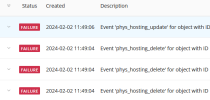
Should I just ignore or there are some actions I can take to cancel this error?
Thanks
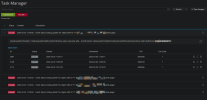
After searching a bit more on this forum, I found that this seems like an issue that happened with other Plesk users as well.
I don't have a solution on how to fix this.
The only thing I can advise you is to contact Plesk support so they can investigate and fix the issue directly on your server:
Thanks, as the support is not free and I have not a paid support plan and cannot pay for now, I just looked for help here.
Well I share my issue experience, hope someone else can maybe report this issues to Plesk and a fix can come with a future update.
Will be nice if the Plesk Diagnostic tool will be bale to discover and fix this issues in the future.
I guess that some event was defined that refers to a domain that no longer exists, or maybe a static ID is used. Indeed it would be good if someone from support could check it directly on the server.