• We value your experience with Plesk during 2025
    Plesk strives to perform even better in 2026. To help us improve further, please answer a few questions about your experience with Plesk Obsidian 2025.
    Please take this short survey:

    https://survey.webpros.com/
  • On Plesk for Linux mod_status is disabled on upgrades to improve Apache security.
    This is a one-time operation that occurs during an upgrade. You can manually enable mod_status later if needed.

Issue Backup to FTPS Server - some work and some fail

Scott.B

Basic Pleskian
Server operating system version
CentOS 7.9
Plesk version and microupdate number
Plesk Obsidian 18.0.75
We have been having the backups for our domains and server working for well over a year without issue. They backup to a FTP Server we have. Now all of a sudden in the last 2 weeks backups for certain domains and our full server backup stopped working, while backups for some domains work fine.

For the domain backups that are failing, the following error is reported
Error:
Unable to create the remote backup: Transport error: Unable to resume an interrupted upload: Requested data is out of the cached data (current cache size: 5 MB, cached data size: 5 MB, required data size: 18340 MB): The connectivity problem: (28) Timeout was reached: The last FTP request: STOR backup_roncosafety.com_2601100205.tar: The last FTP response: 150 Opening data channel for file upload to server of "/backup_roncosafety.com_2601100205.tar"
Warning:
Unable to delete the incomplete remote backup. Error: Failed to exec pmm-ras: Exit code: 126: Transport error: Unable to delete the specified file: Curl error: (21) Quote command returned error: The last FTP request: DELE backup_roncosafety.com_2601100205.tar: The last FTP response: 500 Failed to delete the file
Why do some of the backups work, but others all give the error above?
 
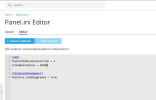
So I used the Panel.ini editor within Plesk and added streamCacheSize = 20480 under the PMM section.

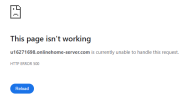
Once I did that I was no longer able to access the Backup Manager area for any domain and got the following page instead. The moment I removed the newly added directive to Panel.ini file, I was able to access the Backup Manager. I do not know if the backups will work after adding the directive, because as noted I cannot access the Backup Manager to trigger a backup.

chrome_AvH1KiIaEr.png
 
I followed the instructions in the link provided to enable debug mode with all options underlined in red, but when I did that I could no longer access Plesk and got the following. So to reverse the changes.
1768940368510.png
 
OK so I decided to try enabling debug mode again, but this time I set debug mode to on and only enable the Log messages verbosity level to 7 using "filter.priority = 7".

Doing this allowed Plesk to still work so that I could reproduce the error. I've attached the panel.log file for your review.
 

Attachments

  • panel.zip
    3 KB · Views: 2
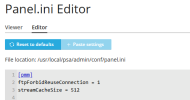
Thank you. Could you please try adjusting the streamCacheSize to something lower, like, 512 for example? I would like to confirm if that will sort out the std::bad_alloc error for a start.
 
I set the streamCacheSize to be 512 as requested, and I did not get the std::bad_alloc error, as shown in image below.
1769009533779.png

So as a test I kept trying different increments of 1024 starting with 10 x 1024 = 10240. I was able to go 12 x 1024 = 12288 without getting the std::bad_alloc error. The moment I put 13312 which is 13 x 1024 I got the error.

But I do not think the setting of 12288 will work, as the original problem states the following, which means I need to set it to at least 18340, but this will cause the error.
Transport error: Unable to resume an interrupted upload: Requested data is out of the cached data (current cache size: 5 MB, cached data size: 5 MB, required data size: 18340 MB)
 
Thank you for the confirmation. This likely occurs due to lack of memory. However, the underling issue is that the backup process gets interrupted in the first place. Has there been any significant increase of the failing website's data or any adjustments on the remote FTP server?
 
No there has been no major increase in data size of website backups from when it was working just a few weeks ago to now. They may have increased in size by maybe a few hundred MB. Also nothing has changed from a FTP server side either.

As for the Plesk server it has 16Gb memory which it always had and we were still backing large backups of 15-20GB and our whole server backup which is about 60GB.
 
Thank you for the confirmation. What I can suggest as part of troubleshooting is to test the connectivity to the FTP server from another device. If possible, try uploading a file with roughly the same size of the backup.
 
Back
Top