Facebook
 Twitter
emretunahan
New Pleskian
- Server operating system version
- AlmaLinux 8.10
- Plesk version and microupdate number
- 18.0.74.3
Merhaba,
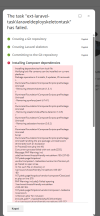
Laravel Toolkit extension during a fresh application installation. Even on a brand new, empty domain, the "Create Laravel skeleton" task fails at the "Installing Composer dependencies" step.
Environment Information:
This leads to a fatal error because the script tries to include files that are being removed or are missing from the newly created skeleton. Specifically:Message: PHP Warning: include(.../vendor/composer/../sebastian/version/src/Version.php): Failed to open stream: No such file or directory.
Key Observations:
Please investigate why the skeleton deployment is failing despite having the most up-to-date environment.
Best regards.
Laravel Toolkit extension during a fresh application installation. Even on a brand new, empty domain, the "Create Laravel skeleton" task fails at the "Installing Composer dependencies" step.
Environment Information:
- Laravel Toolkit Version: 1.5.4-4319
- Composer Version: 2.9.2 (2025-11-19)
- PHP Version: 8.3.28 (cli)
- Server OS: Linux (Plesk environment)
This leads to a fatal error because the script tries to include files that are being removed or are missing from the newly created skeleton. Specifically:Message: PHP Warning: include(.../vendor/composer/../sebastian/version/src/Version.php): Failed to open stream: No such file or directory.
Key Observations:
- This is happening on a clean domain with no existing files.
- 2.8.12 would resolve this, but I am using 2.9.2 and the issue still persists.
- The toolkit version is the latest available (1.5.4).
Please investigate why the skeleton deployment is failing despite having the most up-to-date environment.
Best regards.