Follow along with the video below to see how to install our site as a web app on your home screen.
Note: This feature may not be available in some browsers.
We value your experience with Plesk during 2025 Plesk strives to perform even better in 2026. To help us improve further, please answer a few questions about your experience with Plesk Obsidian 2025. Please take this short survey: https://survey.webpros.com/
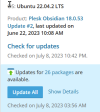
I did my updates meanwhile and System Overview still shows old information about the updates - you can see it at the timestamps. Checked for updates at 10:42 PM and ot shows still checked at 03:56 AM below, so it wasn't updated by clicking "Check for updates".
It is possible that the information is cached. Please try to open Tools & Settings > Server Management > System Updates and check the update status there once, then return to the Home page. Is the extra information gone?