Follow along with the video below to see how to install our site as a web app on your home screen.
Note: This feature may not be available in some browsers.
We value your experience with Plesk during 2025 Plesk strives to perform even better in 2026. To help us improve further, please answer a few questions about your experience with Plesk Obsidian 2025. Please take this short survey: https://survey.webpros.com/
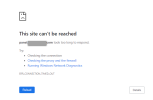
I have an issue since I had changed the DNS records from CloudFlare to Ionos, the issue is that Plesk is not working on Chrome but it's working on other browsers, I flashed DNS and restarted PC and waiting 24 hr but nothing changed. screenshot attached for the error on chrome.
I can successfully open the page in my Chrome here. So it is quite likely that the issue exists with your individual Chrome installation. Chrome is able to block specific ports, maybe there is a configuration issue in that setting?