• We value your experience with Plesk during 2025
    Plesk strives to perform even better in 2026. To help us improve further, please answer a few questions about your experience with Plesk Obsidian 2025.
    Please take this short survey:

    https://survey.webpros.com/
  • On Plesk for Linux mod_status is disabled on upgrades to improve Apache security.
    This is a one-time operation that occurs during an upgrade. You can manually enable mod_status later if needed.

Issue Can't add a new domain/Project

jescayola

New Pleskian
Server operating system version
Debian 11.11
Plesk version and microupdate number
Plesk Obsidian v18.0.75_build1800260102.11 os_Debian 11.0
When I try to add a new domain with a basic configuration (blank website) it stops with an error like this (domainname.es is not the real domain):

"System user update is failed: Unable to create system user: vhostmng-structure failed: Cannot create directory /domainname.es: Operation not permitted
System error 1: Operation not permitted"

Before posting more data from the log, any clue?

Thank you!
 
Hi! thank you for your reply!
I tried that and this is the output:
"
Checking Linux system files

There are incorrect permissions on some items: /var/lock .......... [ERROR]
To see more details, run the command in the verbose mode: plesk repair fs -verbose
Do you want to repair incorrect permissions? [Y/n] y
Repairing incorrect permissions ................................. [2026-02-04 21:24:05.993] 2039910:6983aae5f263a ERR [util_exec] proc_close() failed ['/opt/psa/admin/bin/fsmng' '--set-ac' '/var/lock'] with exit code [1]
[FAILED]
- fsmng failed: ERROR: Cannot fix %s: file exists and it is not a
symlink
"
It found some error and I was asked to fix them, but at the end I have tried to create the project again with no success :(
 
Hi again! Well, I tried plesk repair fs and got this at the panel.log:


[2026-02-09 09:45:26.500] 622181:69899ea67a2c6 ERR [util_exec] proc_close() failed ['/opt/psa/admin/bin/fsmng' '--set-ac' '/var/lock'] with exit code [1]
[2026-02-09 09:45:26.501] 622181:69899ea67a2c6 ERR [panel] '/opt/psa/admin/bin/fsmng' '--set-ac' '/var/lock' failed with code 1.


[2026-02-09 09:50:12.074] 622181:69899ea67a2c6 ERR [util_exec] proc_close() failed ['/opt/psa/admin/bin/vhostmng-content'] with exit code [1]
[2026-02-09 09:50:12.075] 622181:69899ea67a2c6 ERR [panel] '/opt/psa/admin/bin/vhostmng-content' failed with code 1.

[2026-02-09 09:53:13.388] 636493:6989a0743aaf4 ERR [util_exec] proc_close() failed ['/opt/psa/admin/bin/vhostmng-structure'] with exit code [1]
[2026-02-09 09:53:13.390] 636493:6989a0743aaf4 ERR [panel] '/opt/psa/admin/bin/vhostmng-structure' failed with code 1.


also, I have detected some vhosts folders with these permissions:
drwx-w--w- 2 root root 4096 Nov 28 06:53
or
drwx------ 2 root root 4096 Feb 9 09:53

They should't be there as I already deleted the projects from Plesk interface and I can't seem to be able to delete them manually as I get this error:
rm: cannot remove 'theproject.com/': Operation not permitted
I can't delete another project from the panel, which is already disabled.
Maybe this is related to what is happening?
 
I tried creating the new project again and check the log, this is what I got:

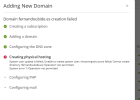
[2026-02-09 21:43:52.827] 885929:698a47062b6fb ERR [panel] Task failed: id=19623, pid=885929, type=domain-create, error=PleskFatalException: System user up date is failed: Unable to create system user: vhostmng-structure failed: Cannot create directory /fernandoubide.es: Operation not permitted
System error 1: Operation not permitted
file: /opt/psa/admin/plib/PHostingManager/Abstract.php
line: 834
code: 0
trace: #0 /opt/psa/admin/plib/PHostingManager/Apache.php(187): PHostingManager_Abstract->_updateSysUser(boolean true)
#1 /opt/psa/admin/plib/Transaction/Rollback.php(19): PHostingManager_Apache->transactionalUpdate(object of type Transaction_Rollback)
#2 /opt/psa/admin/plib/PHostingManager/Apache.php(147): Transaction_Rollback->commit(array)
#3 /opt/psa/admin/plib/DSWeb.php(232): PHostingManager_Apache->update()
#4 /opt/psa/admin/plib/Commands/CreateSubscription.php(317): DSWeb->update()
#5 /opt/psa/admin/plib/Transactional.php(205): Commands_CreateSubscription->applyHosting()
#6 /opt/psa/admin/plib/Transactional.php(135): Transactional->apply()
#7 /opt/psa/admin/plib/Commands/CreateSubscription.php(82): Transactional->execute()
#8 /opt/psa/admin/plib/CommonPanel/Domain/Task/Create.php(112): Commands_CreateSubscription->create()
#9 /opt/psa/admin/plib/CommonPanel/Domain/Task/Create.php(35): Plesk\CommonPanel\Domain\Task\Create->createSubscription(array, integer '1', boolean false)
#10 /opt/psa/admin/plib/Db/Table/Broker/LongTasks.php(178): Plesk\CommonPanel\Domain\Task\Create->run()
#11 /opt/psa/admin/plib/Db/Table/Broker/LongTasks.php(113): Db_Table_Broker_LongTasks->_syncStart(object of type Db_Table_Row_LongTask)
#12 /opt/psa/admin/plib/Task/Async/Executor.php(54): Db_Table_Broker_LongTasks->runTaskWithinExecutor(object of type Db_Table_Row_LongTask)
#13 /opt/psa/admin/plib/scripts/task-async-executor.php(6): Task_Async_Executor->execute()
1770709112539.png
I suppose the filesystem is compromised somewhow and I will have to repair it manually, anyone has had to perform something like this? Thank you!
 
Back
Top