Facebook
 Twitter
scottthepotter
Basic Pleskian
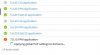
Whenever I navigate to 'PHP Settings' the '7.0.15 FPM Application' line has a warning flag and keeps spinning with the message 'Applying global PHP settings to domains'. This is after I have restarted the server, I moved all domains to PHP 5.6, I reconfigured all domains. I ran the command '/usr/local/psa/bin/php_settings -u', I have removed PHP 7.0 from the 'Add or Remove Components'. I have added PHP 7.0 back again, then I removed it again. I have restarted the Plesk service multiple times and the server multiple times. Nothing in the control panel logs is giving me any clues. No joy :-( Screenshot attached.