Follow along with the video below to see how to install our site as a web app on your home screen.
Note: This feature may not be available in some browsers.
We value your experience with Plesk during 2025 Plesk strives to perform even better in 2026. To help us improve further, please answer a few questions about your experience with Plesk Obsidian 2025. Please take this short survey: https://survey.webpros.com/
Hello,
how can I teach the Nginx web server under Plesk Onyx to exclude the IP adress for example 1.2.3.1-1.2.3.255?
Where do I have to enter the IPs to be blocked?
Thanks for help
Paul
Yes, thats what I want. To block adresses from China Bots or US Bots for example.
I had a lot of them blocked with htaccess, but now I need to use Nginx and want to do the same
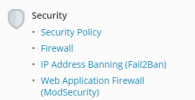
Instead of using Nginx you are probably better off using the Plesk Firewall. You can find the Plesk Firewall under Tools & Settings > Security.
Also do you have fail2ban running on your server? Fail2ban automatically bans IP address that try to brute force attack your server. A really useful tool! More info on: Protection Against Brute Force Attacks (Fail2Ban)