Facebook
 Twitter
Is there a way to completely hide "Applications" from subscriptions? I've already selected "Provide only applications that I select" in the Service Plan -> Applications settings and haven't selected any application, which essentially returns an empty list of applications - so that's one workaround.
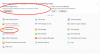
However, even after unselecting "Access to Application Catalog" from Service Plan -> Permissions, some text/buttons related to applications still remain i.e see screenshot.
Running on latest Obsidian 18.0.26.
However, even after unselecting "Access to Application Catalog" from Service Plan -> Permissions, some text/buttons related to applications still remain i.e see screenshot.
Running on latest Obsidian 18.0.26.