Follow along with the video below to see how to install our site as a web app on your home screen.
Note: This feature may not be available in some browsers.
We value your experience with Plesk during 2025 Plesk strives to perform even better in 2026. To help us improve further, please answer a few questions about your experience with Plesk Obsidian 2025. Please take this short survey: https://survey.webpros.com/
- Navigate to Tools & Settings
- PHP Settings
- Where you have this text at the top: "Select the PHP handlers you want to make available. You can install additional handlers using the Plesk Installer." click on Plesk Installer
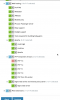
- In Plesk Installer, go to Web Hosting -> Apache -> mod_python to see if you have it installed, if not, install it by clicking on the dropdown area and choose install.
- Click on the Continue button and follow the steps to the end to install.
I have it so maybe it depends because I have it as originally I had plesk 17.5 and updated to 17.8, but coming directly from 17.8, I do not know if it is there... apparently is not.