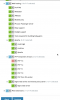
- Navigate to Tools & Settings
- PHP Settings
- Where you have this text at the top: "Select the PHP handlers you want to make available. You can install additional handlers using the Plesk Installer." click on Plesk Installer
- In Plesk Installer, go to Web Hosting -> Apache -> mod_python to see if you have it installed, if not, install it by clicking on the dropdown area and choose install.
- Click on the Continue button and follow the steps to the end to install.
I have it so maybe it depends because I have it as originally I had plesk 17.5 and updated to 17.8, but coming directly from 17.8, I do not know if it is there... apparently is not.

 Facebook
 Twitter