• We value your experience with Plesk during 2025
    Plesk strives to perform even better in 2026. To help us improve further, please answer a few questions about your experience with Plesk Obsidian 2025.
    Please take this short survey:

    https://survey.webpros.com/

How to get app vault items

Amin Taheri

Golden Pleskian
Plesk Certified Professional
Hi guys,

I just installed Plesk 12.0.18 and I am trying to get application vault items, but I dont see any way to chose which ones are able to be installed (the server has none - including no wordpress).

How do I get the list of apps that I can install like was present in the older versions?
 
Hi Amin Taheri,

first, please make sure, that the Application Vault is visible: Home > Tools & Settings > Custom View Settings

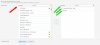
Second, please make sure, that either the restricted access over your subscription settings is not set ( "Provide only applications that I select" at "Home > Service Plans > Hosting Plans > YOUR_SERVICE_PLAN" ) and IF you choose to limit the applications with restriction in your service plan, then please make sure, that you choosed available applications for your subscriptions:

Service_Plan_Applications_custom_001.jpg
 
Last edited by a moderator:
Thank you much for the reply - in your screen shot you have a list of applications to select. My list is empty - how do I get that list to populate?
 
Hi Amin Taheri,

you can try to clear the cache ( "Home > Tools & Settings > Application Vault > Clear cache" ) , so that Plesk reloads the available applications. If you experience issues here, please have a look at the Plesk Control Panel log - files for investigations.
 
Back
Top