Resolved Linux SED command doesn't work with task scheduler

NicolasUni

Basic Pleskian
Server operating system version
Debian 11.6
Plesk version and microupdate number
18.0.50
Dears all,

I face a issue : linux sed command is not recognized by plesk task scheduler…

Any idea ?

Thank you for your help

Best regards,

Nicolas

Quote Reply
Report
 
You can if you're using it in a cronjob, but you need to provide the full path for example /usr/bin/sed (you can find the location of it by SSHing into the server and typing which sed)
 
Hello scsa 20,

Could you be more specific please ?

My actual command wich runs well within ssh is :

sed -i -e 's/67/Bas-Rhin/g' -e 's/68/Haut-Rhin/g' /var/www/vhosts/exemple.com/httpdocs/wp-content/uploads/files/flux-uuuuu.csv

How do you modify it ?

Regards,
 
Bash:
/usr/bin/sed -i -e 's/67/Bas-Rhin/g' -e 's/68/Haut-Rhin/g' /var/www/vhosts/exemple.com/httpdocs/wp-content/uploads/files/flux-uuuuu.csv
 
Task "/usr/bin/sed -i -e 's/xxxxx " completed with error in 0 seconds, output:
-: line 1: /usr/bin/sed: No such file or directory
 
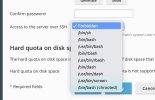
May be I need to grant /bin/sh to this specific site inn order to unlock this sed command ?
 

Attachments

  • Capture d’écran 2023-02-27 à 22.15.28.jpg
    Capture d’écran 2023-02-27 à 22.15.28.jpg
    97.9 KB · Views: 6
Are you running the scheduled task at the server level or domain level? Creating the task at the system level (Tools & Settings > Scheduled Tasks) gives you a bit more flexibility including which user should be acting as the executor.
 
Dear scsa20, I ve just have a go at it by system level and all goes well !

Thank you, dears scsa20 and kaspar,

Have a good day (or evening or night)

Best regards,

Nicolas
 
Back
Top