• We value your experience with Plesk during 2025
    Plesk strives to perform even better in 2026. To help us improve further, please answer a few questions about your experience with Plesk Obsidian 2025.
    Please take this short survey:

    https://survey.webpros.com/

LVM problems?

synthetic5995

Basic Pleskian
I downloaded and install Plesk(x86_64) from:http://www.parallels.com/download/plesk/images/.

But this ISO software automatically partition my 300GB HDD to:

/dev/mapper/VolGroup-lv_root (50GB) - main use.
/dev/mapper/VolGroup-lv_home (250GB) - no use.

My question is: How to re-size this partition, because if VolGroup-lv_root has only 50GB, it's will be full very fast and waste capacity of our HDD.

P/s: Our system is running as a service, i don't want to stop our service.

Thank You so much!
 
Hello,

You will have to contact your System Admin they will reduce your LV VolGroup-lv_home and increase your VolGroup-lv_root partition and you should not face any issues with the current installation

Thanks
 
Actually, I'm the system admin :(

And how to "reduce your LV VolGroup-lv_home and increase your VolGroup-lv_root partition", i mean, do Plesk have some procedure to do that? Because i downloaded this ISO image from official page of Plesk and i cannot customize my HDD :(
 
This is home folder:

[root@xxx ~]# cd /home
[root@xxx home]# ls -al
total 32
drwxr-xr-x. 5 root root 4096 Apr 3 11:35 .
dr-xr-xr-x. 25 root root 4096 May 21 14:44 ..
drwxr-xr-x 2 root root 4096 Jun 6 2012 ftp
drwx------. 2 root root 16384 Apr 3 10:52 lost+found
drwxr-xr-x. 2 root root 4096 Apr 3 11:48 plesk
[root@xxx home]# cd plesk
[root@xxx plesk]# ls
autoinstaller3.log ok.flag parallels_installer_RedHat_el6_x86_64 update.flg
functions.in os.in pleskinst.sh

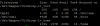
And this is disk info:
qwMTVP8.png
 
Hello,

I can see you have only 197MB data on your /home partition so you can delete that partition and create it again with some disk space, But please make sure take a backup of /home directory and stop all services before deleting your /home partition and than you can increased you main partition (/dev/mapper/VolGroup-lv_root )

Also check your /etc/fstab file once it's done so that you will not face issues when you reboot your server

Thanks
 
Back
Top