• We value your experience with Plesk during 2025
    Plesk strives to perform even better in 2026. To help us improve further, please answer a few questions about your experience with Plesk Obsidian 2025.
    Please take this short survey:

    https://survey.webpros.com/

Issue Nextcloud: Bug after changing admin

SebastianBerlin

New Pleskian
Server operating system version
Nextcloud v32.0.3, Nextcloud (Plesk extension) v1.7.2-6622, PHP v8.4.15, Ubuntu v24.04.3 LTS, Apache v2.4.58, nginx v1.28.0
Plesk version and microupdate number
18.0.74 Update 3
Via the Plesk module I've installed and setup a fresh Nextcloud installation. After changing the admin at the Nextcloud instance (new admin, deleting the old one) the old admin is still in charge at the Plesk module, even though the user doesn't exist at all.
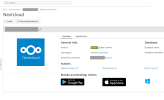
1766321880784.png
I don't see a way to change the admin to the new one.

Also every ten minutes the module tries to login/ping the already deleted user. At nextcloud.tld/settings/admin/logging there are many warnings:
Code:
Login failed: 'DELETED_ADMIN_USERNAME' (Remote IP: 'XYZ')

Details:
Code:
{
  "reqId": "XYZ",
  "level": 2,
  "time": "2025-12-21T13:59:01+01:00",
  "remoteAddr": "XYZ",
  "user": "--",
  "app": "core",
  "method": "GET",
  "url": "/ocs/v2.php/cloud/users/DELETED_ADMIN_USERNAME?format=json",
  "message": "Login failed: 'DELETED_ADMIN_USERNAME' (Remote IP: 'XYZ')",
  "userAgent": "Mozilla/5.0 (compatible; Nextcloud Plesk Extension/1.7.2; XYZ)",
  "version": "32.0.3.2",
  "data": {
    "app": "core"
  },
  "id": "XYZ"
}

Could you please fix that and/or tell me how to edit the settings? Thank you.
 
Hello, @SebastianBerlin . Unfortunately when you change password in Nextcloud directly, Nextcloud does not notify Plesk about password changes, and/or passing the password elsewhere. The password in the oc_users table of the NC database is hashed with argon2, hence Plesk cannot decrypt it. This means that once password has been changed from Nextcloud, autologin from Plesk will no longer be available. As workaround, I can only suggest updating password manually in /usr/local/psa/var/modules/nextcloud/nextcloud.sqlite3, instances table to get autologinAction() working:
  1. Backup /usr/local/psa/var/modules/nextcloud/nextcloud.sqlite3 just in case.
  2. Check and update password here:
sqlite3 /usr/local/psa/var/modules/nextcloud/nextcloud.sqlite3
sqlite> .headers on
select id,ncUser,ncPass from instances;
 
Hello, @SebastianBerlin . Unfortunately when you change password in Nextcloud directly, Nextcloud does not notify Plesk about password changes, and/or passing the password elsewhere. The password in the oc_users table of the NC database is hashed with argon2, hence Plesk cannot decrypt it. This means that once password has been changed from Nextcloud, autologin from Plesk will no longer be available. As workaround, I can only suggest updating password manually in /usr/local/psa/var/modules/nextcloud/nextcloud.sqlite3, instances table to get autologinAction() working:
  1. Backup /usr/local/psa/var/modules/nextcloud/nextcloud.sqlite3 just in case.
  2. Check and update password here:

I haven't talked about autologin and/or editing the password. It's obviously an at least 5 years old bug, which isn't fixed so far.
 
Back
Top