Follow along with the video below to see how to install our site as a web app on your home screen.
Note: This feature may not be available in some browsers.
We value your experience with Plesk during 2025 Plesk strives to perform even better in 2026. To help us improve further, please answer a few questions about your experience with Plesk Obsidian 2025. Please take this short survey: https://survey.webpros.com/
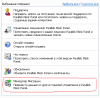
I can't view the Plesk Migration Manager button on Homepage my Plesk Panel. Plesk - 9.5.1, Migration Agent - 9.5.1.
In the template button exists, see attachment. On homepage button can't view.
How fix?
Sorry, my mistake. It is command for Unix Plesk.
Seems you have not installed Migration Manager. Just go to Add/Remove Programs and click Modify for Plesk installation. Select PMM there and install it. After that button should be on Home page.