Follow along with the video below to see how to install our site as a web app on your home screen.
Note: This feature may not be available in some browsers.
We value your experience with Plesk during 2025 Plesk strives to perform even better in 2026. To help us improve further, please answer a few questions about your experience with Plesk Obsidian 2025. Please take this short survey: https://survey.webpros.com/
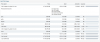
I get the message "not enough disk space"
I'm not using more then 500 MB en my is disk space is 50 GB.
In the attachment you see what's going on.
Can anyone help me to resolve this?
The disc usage in the image is for the designated partitions ...(and not necessarily the entire HDD). Solution would be to increase disc space usage on those respective partitions...
That is very possible especially if you have a problem with log-rotation on your server. Start by looking at your logs and measuring how much storage they occupy on the server.
You can get all storage of log files (sorted from biggest to smallest) with the command below: