• Inviting everyone who uses WordPress management tools in Plesk
    The Plesk team is conducting a 60-minute research session that includes an interview and a moderated usability test.
    To participate, please use this link .
    Your experience will help shape product decisions and ensure the tools better support real-world use cases.

Issue Please make Plesk GUI front page actually link through to reported issues!!

MHC_1

Regular Pleskian
Plesk Obsidian 18.0.76#2

Look at the Plesk Admin GUI Home page, it's full of abstract (usually numerical) information but with NO WAY OF GOING DEEPER!
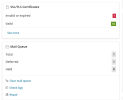
Screenshot from 2026-03-12 10-52-21.png

See here it tells me I have 1 invalid or expired domain; but no way of clicking through to see what this domain is. --

See it tells me we have 1 mail in the queue that's not being delivered, but no way of seeing what that mail is -- although bizarrely it goes give a shortcut to clear the queue which is a wyrd idea if we can't see what we're clearing!

To check the SSL I have to go to "See More" and then click through multiple listings to find the one that's the issue. Why can't the notification link me to a listing of JUST the issue domains?

Same with the Mail Queue, to view the mail queue I currently need to go to "Tools & Settings", then to "Mail Queue" then need to scroll past the "active" mails to find the Deferred ones. Why not simply make the numbers or the deferred listed in their own list from the front page notification.


It seems the people who build Plesk don't actually use it.
 
To check the SSL I have to go to "See More" and then click through multiple listings to find the one that's the issue. Why can't the notification link me to a listing of JUST the issue domains?
I don't know, when I click see more it shows the problem domains at the top. Plus you could use a filter to filter only the domains with expired certs.

As for the mail queue one, there's another "see more" which does take you directly to the mail queue.
 
I don't know, when I click see more it shows the problem domains at the top. Plus you could use a filter to filter only the domains with expired certs.

As for the mail queue one, there's another "see more" which does take you directly to the mail queue.
No, neither of these things do so. They show me all elements rather than just the specific ones being highlighted by the Front Page GUI.
 
@MHC_1 , we already have an initiative for improving the SSL It! widget so clickable links can be integrated that will directly list the corresponding sorting. For the time being, please use the manual filtering options.

Same with the Mail Queue, to view the mail queue I currently need to go to "Tools & Settings", then to "Mail Queue" then need to scroll past the "active" mails to find the Deferred ones. Why not simply make the numbers or the deferred listed in their own list from the front page notification.

As @scsa20 pointed, the "See more" button should directly take you to the queue. I would like to get a better understanding on how this widget could be improved in your view. Thank you in advance.
 
As @scsa20 pointed, the "See more" button should directly take you to the queue. I would like to get a better understanding on how this widget could be improved in your view. Thank you in advance.

Hello.
Ok, I know this will come across as a massive bitch and apologies in advance, but :

ONE

On our Plesk we have 93 OK SSL , we have 1 marked as "expiring soon" and we have 1 marked as "invalid". Clicking on "See More" this simply lists all of them, so it lists 95 rows by what looks like name order without any ability to sort the rows via this metric -- as in, we can sort by name but not by status,

TWO

We can set the SSL it table to "list all" on one page, but this is NOT remembered between page loads. So every time we load this page we need to go to the bottom, press the button (and the bottom of the table is off the bottom of the screen view so needs scrolling).

THREE

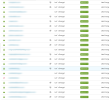
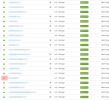
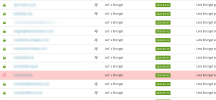
So we then still need to go through the whole table and manually find the one single row that's "different". But the difference is very, very slight -- as in, the usual icon (Green padlock, the colour is heavy and the icon is clear; whereas the broken icon, the icon is lighter, there is no "colour block" and the icon is far harder to notice. This is the exact inverse of what it should be.

Please see an illustrative below; for each image when you open it full screen judge how fast you can find the row that needs attention:

1_Screenshot from 2026-03-13 13-02-21.png

2_Screenshot from 2026-03-13 13-01-40.png

3_Screenshot from 2026-03-13 12-57-15.png

You will find the easiest and fastest to identify is the third one, and the second one. You might also notice because of the lack of identity the first image takes MUCH longer to see what's going on and what needs attention.

FOUR

"Expiring Soon" is marked as an issue but that row in the listing has no indication it is an issue - this is ambiguous, does this need attention or not? We find it never does as they auto renew but obviously it does need attention in some instances (such as paid for certificates etc.) BUT the home page says it's an issue but the SSL Listing doesn't give any clues.

Rather like above; table rows with invalid or expired should have a transparent red background (0.4 opacity exampled above) but then also ones coming up for expiry can have another background such as transparent green or something to show this is on the horizon.

FIVE

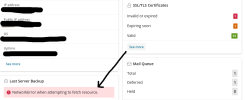
The"See More" button comes back with an error if it is visited more than once. To clear this error we need to exit the home view by visiting any other page, then returning to the home view and then retrying the button.

Screenshot from 2026-03-13 13-11-10.png


Ok that's all. I hope that's helpful!!
 
Thank you, your feedback is highly appreciated. Essentially, pretty much all points will be addressed by the initiative in question. However, I cannot provide an ETA yet, but I can provide a few tips on how to better navigate in the meantime. There's "Filter" option that should allow you to sort out the "Expired" certificates. I believe the invalid certificates could be sorted by the "Domain mismatch", but I need to confirm that to be 100% sure (Will do that on Monday). As for those expiring soon, you can sort the certificates by "Expiration date" directly from the list. You have a great point here. I will discuss with our team if those certificates could be highlighted for better recognition.

FIVE

The"See More" button comes back with an error if it is visited more than once. To clear this error we need to exit the home view by visiting any other page, then returning to the home view and then retrying the button.

I can't seem to be able to replicate that behavior with the "SSL/TLS Certificates" or "Last Server Backup" widgets. Can you please provide me with step-by-step instruction on how to do so, e.g. do you target "See more" into a new tab than come back, or several tabs are opened at once, etc. And is the error the one shown on the screenshot "NetworkError when attempting to fetch resource.". Thanks in advance.
 
@Sebahat.hadzhi thanks for the follow up on this.

- Domain Mismatch in the filter does indeed show just the target SSL. That's fine. However, again; it goes back to being extra steps (click filter; select then click ok) whereas if the Row on the widget on the home page goes straight to the filtered listing that would be perfect and quicker.

- I fully acknowledge that the "expiry date" highlight is easily findable by listing by date, but from a concept point of view, if the row(s) on the widget is highlighted as an issue but it is not highlighted in the list of SSL then that's inconsistent (options; highlight the row(s) on the listing or don't highlight "Expiring soon" on the widget)

RE point Five I will find an error log on our Plesk and post that here.
 
@Sebahat.hadzhi

or "Last Server Backup" widgets.

To clarify; After some more digging it seems that in certain instances the clicking of "See More" in the SSL it! Widget interrupts some background activity and interrupts the "Last Server Backup" widget feeding back to the home screen GUI.

By changing the browser screensize the "NetworkError" reply always appears inside the "Last Server Backup" tab, even though it always appears in relation to the SSLit! "See More" button being pressed . It's caused when the "See More" button is clicked too soon after page load (within ~10 seconds) or at other times I can't clearly distinguish when. Occurs maybe 50% of the time the button is clicked.

(also possibly the notification is set to always appear in this part of the screen? )

Attachment is screenshot just after "See More" button is pressed. Nothing loads and "feels" like script has interrupted (no browser console.log output however)
 

Attachments

  • Screenshot from 2026-03-13 18-57-20.png
    Screenshot from 2026-03-13 18-57-20.png
    60.6 KB · Views: 4
Back
Top