
 Facebook
 Twitter
On the screen at Settings -> Mail Server Settings ( :8443/plesk/server/mail/ ) - the heading "Antivirus settings".
When the Plesk Email Security Pro extension is purchased and installed, which includes ClamAV anti-virus, the above Plesk setting page still says "Used Antivirus: None" which is incorrect as the Plesk Email Security page ( :8443/modules/email-security/index.php/) lists ClamAV as "RUNNING".
When Plesk Email Security Pro is active, there should be a message on the Mail Server Settings screen that ClamAV is active.
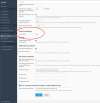
When the Plesk Email Security Pro extension is purchased and installed, which includes ClamAV anti-virus, the above Plesk setting page still says "Used Antivirus: None" which is incorrect as the Plesk Email Security page ( :8443/modules/email-security/index.php/) lists ClamAV as "RUNNING".
When Plesk Email Security Pro is active, there should be a message on the Mail Server Settings screen that ClamAV is active.
