• We value your experience with Plesk during 2025
    Plesk strives to perform even better in 2026. To help us improve further, please answer a few questions about your experience with Plesk Obsidian 2025.
    Please take this short survey:

    https://survey.webpros.com/
  • On Plesk for Linux mod_status is disabled on upgrades to improve Apache security.
    This is a one-time operation that occurs during an upgrade. You can manually enable mod_status later if needed.

Issue Plesk how to edit generated db files?

MHC_1

Regular Pleskian
Server operating system version
Alma Linux 9
Plesk version and microupdate number
18.0.74
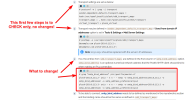
I have an issue that needs urgent attention. The guidance here : https://support.plesk.com/hc/en-us/...end-email-in-Plesk-mail-transport-unavailable states editing files such as
Code:
/var/spool/postfix/plesk/sdd_transport_maps
but the only file in the folder is
Code:
var/spool/postfix/plesk/sdd_transport_maps.db

If I create a new file named "sdd_transport_maps" would this overwrite the db file which I can't edit in the CMD text editor.

Help appreciated how to resolve this?
 
You don't edit anything in the /var/spool directly, everything in there is pretty much generated on the fly. The guide you link is stating what to look for and if you need to make changes you'll want to edit /etc/postfix/master.cf.

Please please please always fully read the article first so you don't jump to conclusions before editing anything.
 
You don't edit anything in the /var/spool directly, everything in there is pretty much generated on the fly. The guide you link is stating what to look for and if you need to make changes you'll want to edit /etc/postfix/master.cf.

Please please please always fully read the article first so you don't jump to conclusions before editing anything.

No where on that documentation does it explicitly state that edits should only be made to the master.cf file.
No where does it show example of editing the master.cf file; other documentation pages show examples of opening and editing the master.cf or main.cf files. Here this is absent which implies that's not what's intended.

Clarification on the documentation would be very helpful here.

It's easy to spot the issue when you know the answer.
 
Back
Top