• We value your experience with Plesk during 2025
    Plesk strives to perform even better in 2026. To help us improve further, please answer a few questions about your experience with Plesk Obsidian 2025.
    Please take this short survey:

    https://survey.webpros.com/

Resolved Plesk is listing directory /usr/share/httpd/icons

Nilton Santos

Basic Pleskian
Hi everybody,

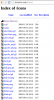
I noticed that all sites hosted on plesk servers are listing the contents of the folder /usr/share/httpd/icons when accessed through the link: http://domain.com/icons/
Even if the folder icons does not exist on site


Could someone please let me know if this behavior is normal, because We use a tool that is identifying this folder as unsafe.
 

Attachments

  • icons_list.png
    icons_list.png
    82.4 KB · Views: 17
Hi Nilton Santos,

could you pls. let us know, HOW you checked this behaviour? ( step-by-step, pls. ), so we could confirm your statement? And could you pls. name the "tool", that "We use a tool that is identifying this folder as unsafe" ?
 
Can't reproduce it on test Plesk servers. Need more details.
 
Hello Nilton,

Please check the following documentations:
https://kb.odin.com/en/130400
https://blog.cotten.io/why-is-apache-vulnerable-by-default-743eec222013#.d4d2urirj

Apache includes Fancy Indexes and the /icons folder has a specific override in /etc/httpd/conf.d/autoindex.conf

In my opinion to solve this problem you can choose between two alternatives as follows:

1- Resolving globally by editing the file /etc/httpd/conf.d/autoindex.conf

From:

# We include the /icons/ alias for FancyIndexed directory listings. If
# you do not use FancyIndexing, you may comment this out.
#
Alias /icons/ "/usr/share/httpd/icons/"

<Directory "/usr/share/httpd/icons">
Options Indexes MultiViews FollowSymlinks
AllowOverride None
Require all granted
</Directory>


To:

# We include the /icons/ alias for FancyIndexed directory listings. If
# you do not use FancyIndexing, you may comment this out.
#
Alias /icons/ "/usr/share/httpd/icons/"

<Directory "/usr/share/httpd/icons">
Options -Indexes MultiViews FollowSymlinks
AllowOverride None
Require all granted
</Directory>

Remember to restart apache

(Ref: https://blog.cotten.io/why-is-apache-vulnerable-by-default-743eec222013#.d4d2urirj)

2- By domain

Through the Plesk Panel go to:
Domains > domain.tld > Apache & nginx Settigs

<Directory "/usr/share/httpd/icons">
Options -Indexes
</Directory>


I hope it helps
 
Tanks everybody,

Question was solved add the follow option on Apache settings:

2- By domain

Through the Plesk Panel go to:
Domains > domain.tld > Apache & nginx Settigs

<Directory "/usr/share/httpd/icons">
Options -Indexes
</Directory>


Tanks a lot Rafael.
 
I realise this is an old topic, but still mostly gave the solution.
using the above solution
Rich (BB code):
# We include the /icons/ alias for FancyIndexed directory listings. If
# you do not use FancyIndexing, you may comment this out.
#
Alias /icons/ "/usr/share/httpd/icons/"

<Directory "/usr/share/httpd/icons">
Options -Indexes MultiViews FollowSymlinks
AllowOverride None
Require all granted
</Directory>

apache failed to restart with the following error:
Rich (BB code):
Nov 07 11:39:01 server.co.uk httpd[11727]: AH00526: Syntax error on line 24 of /etc/httpd/conf.d/autoindex.conf:
Nov 07 11:39:01 server.co.uk httpd[11727]: Either all Options must start with + or -, or no Option may.
Nov 07 11:39:01 server.co.uk systemd[1]: httpd.service: main process exited, code=exited, status=1/FAILURE
Nov 07 11:39:01 server.co.uk systemd[1]: Failed to start The Apache HTTP Server.

The solution is to do as it says:
Rich (BB code):
# We include the /icons/ alias for FancyIndexed directory listings. If
# you do not use FancyIndexing, you may comment this out.
#
Alias /icons/ "/usr/share/httpd/icons/"

<Directory "/usr/share/httpd/icons">
Options -Indexes +MultiViews +FollowSymlinks
AllowOverride None
Require all granted
</Directory>

Accessing the folder or subfolder now returns a 403
if you reference the image file eg /icons/index.png they still work correctly just removed the directory browse.

Regards
Keith
 
Back
Top