Facebook
 Twitter
WebbiesTAT
New Pleskian
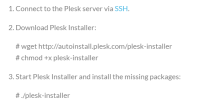
So we decided to realise a dist-upgrade on our servers from debian 9 to debian 10, (on a IONOS virtual server) with this tutorial https://support.plesk.com/hc/en-us/...upgrade-procedure-on-Linux-server-with-Plesk-
But during the dist upgrade, we had had a first problem, indeed, during stage 6 :
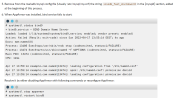
we had this problem :
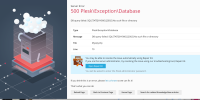
Because "open repair kit" was not working, we decided to reboot the server.
After this, plesk was warking again, so we decided to continue
Then plesk was showing that we have had change of OS :

But we has not finished the tutorial of the dist update.
During these stages :
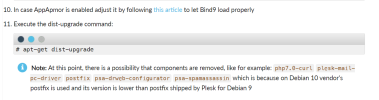
we had a new problem :

but, because plesk showed us that we have "Debian 10" on our server, we decided to skip this part and finish with plesk installer update :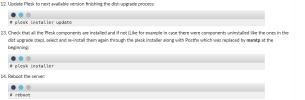
During stage 13, plesk crashed, and when we were trying to reconnect on plesk we just had a blank page with writting "file not found".
So we decided to reboot the server again, and then we have :
We tried to fix it by using plesk repair or plesk installation, but the problem is that the SSH doesn't recognize "plesk" command.
Do you an other solution than just restarting the server from scratch and loading the backup ?
But during the dist upgrade, we had had a first problem, indeed, during stage 6 :
we had this problem :
Because "open repair kit" was not working, we decided to reboot the server.
After this, plesk was warking again, so we decided to continue
Then plesk was showing that we have had change of OS :
But we has not finished the tutorial of the dist update.
During these stages :
we had a new problem :
but, because plesk showed us that we have "Debian 10" on our server, we decided to skip this part and finish with plesk installer update :
During stage 13, plesk crashed, and when we were trying to reconnect on plesk we just had a blank page with writting "file not found".
So we decided to reboot the server again, and then we have :
We tried to fix it by using plesk repair or plesk installation, but the problem is that the SSH doesn't recognize "plesk" command.
Do you an other solution than just restarting the server from scratch and loading the backup ?