• We value your experience with Plesk during 2025
    Plesk strives to perform even better in 2026. To help us improve further, please answer a few questions about your experience with Plesk Obsidian 2025.
    Please take this short survey:

    https://survey.webpros.com/

Set Cronjobs

Geir

Basic Pleskian
Hello,

Somebody so can tell me how i can set CronJobs?

Have never to it before.

Here is what i have from developer:

Final Step: Setup Cron Tasks.

Number of cron (background) tasks to ensure redundant files are deleted, accounts are auto downgraded etc. Details of these are below.

0 0 * * * php /var/www/vhosts/MYDOMAIN/httpdocs/admin/tasks/auto_prune.cron.php >> /dev/null 2>&1
0 0 * * * php /var/www/vhosts/MYDOMAIN/httpdocs/admin/tasks/create_internal_notifications.cron.php >> /dev/null 2>&1
0 * * * * php /var/www/vhosts/MYDOMAIN/httpdocs/admin/tasks/delete_redundant_files.cron.php >> /dev/null 2>&1
0 0 * * * php /var/www/vhosts/MYDOMAIN/httpdocs/admin/tasks/downgrade_accounts.cron.php >> /dev/null 2>&1
*/5 * * * * php /var/www/vhosts/MYDOMAIN/httpdocs/admin/tasks/process_file_queue.cron.php >> /dev/null 2>&1
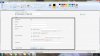
Screenshot plesk.jpg
 
Thanks for good link IgorG :)
Now i understand more how its work with Cron.

But how i can set correct COMMAND for my domain?
Try this:
/usr/bin/perl /var/www/vhosts/CHANGED TO MY DOMAIN/cgi-bin/crontasks/cron.pl

After that i receive 27 emails with following issue:

Can't open perl script "/var/www/vhosts/MYDOMAIN/cgi-bin/crontasks/cron.pl": No such file or directory
And this:

/bin/sh: /usr/bin/perl/var/www/vhosts/MYDOMAIN/cgi-bin/crontasks/cron.pl: Not a directory
 
Last edited:
Do you really have in this path MYDOMAIN? or real domain name?
 
I have set my correct domainname where there stay MYDOMAIN!
I figured it was not allowed and post domain and such here so therefore I added mydomain :)
 
Have you tried run this command in command line? Does it work?
 
Yes i have try this 2 here:

Can't open perl script "/var/www/vhosts/MYDOMAIN/cgi-bin/crontasks/cron.pl": No such file or directory
And this:

/bin/sh: /usr/bin/perl/var/www/vhosts/MYDOMAIN/cgi-bin/crontasks/cron.pl: Not a directory

Where i also change my MYDOMAIN to my own domain!

And after that i receive lot of issue email.
 
Do you really have file /var/www/vhosts/MYDOMAIN/cgi-bin/crontasks/cron.pl ?

Check it with

# ls -la /var/www/vhosts/MYDOMAIN/cgi-bin/crontasks/cron.pl

at least.

/bin/sh: /usr/bin/perl/var/www/vhosts/MYDOMAIN/cgi-bin/crontasks/cron.pl: Not a directory

Looks like there is no space between /usr/bin/perl and /var/www/vhosts/MYDOMAIN/cgi-bin/crontasks/cron.pl in command.
Check it.
 
Thanks for reply IgorG.
In this folder: /var/www/vhosts/MYDOMAIN/cgi-bin/ i only have a folder with name: test for this domain
 
Hi Geir,

this is not really complicated, Geir. Please have again a closer look to the description you got from the developer:

0 0 * * * php /var/www/vhosts/MYDOMAIN/httpdocs/admin/tasks/auto_prune.cron.php >> /dev/null 2>&1
0 0 * * * php /var/www/vhosts/MYDOMAIN/httpdocs/admin/tasks/create_internal_notifications.cron.php >> /dev/null 2>&1
0 * * * * php /var/www/vhosts/MYDOMAIN/httpdocs/admin/tasks/delete_redundant_files.cron.php >> /dev/null 2>&1
0 0 * * * php /var/www/vhosts/MYDOMAIN/httpdocs/admin/tasks/downgrade_accounts.cron.php >> /dev/null 2>&1
*/5 * * * * php /var/www/vhosts/MYDOMAIN/httpdocs/admin/tasks/process_file_queue.cron.php >> /dev/null 2>&1

Now locate the specific files ON YOUR SERVER with the commands:
Code:
locate auto_prune.cron.php
locate create_internal_notifications.cron.php
locate delete_redundant_files.cron.php
locate downgrade_accounts.cron.php
locate process_file_queue.cron.php

The command will point to the desired path and will look like this:

/var/www/vhosts/YOUR_DOMAIN.COM/httpdocs/PATH_TO_THE_PHP_FILE/auto_prune.cron.php

The rest is pretty easy, because you just replace the paths, which you found with the above "locate" - commands and insert the complete cronjob in the field "COMMAND" from your screenshot in the first post from you in this thread. ( i.e.: "php /var/www/vhosts/YOUR_DOMAIN.COM/httpdocs/PATH_TO_THE_PHP_FILE/auto_prune.cron.php >> /dev/null 2>&1" )

The screenshot from you shows as well the additional settings for "MINUTE" "HOUR" "DAY OF THE MONTH" "MONTH" "DAY OF THE WEEK", which the developer defined as:

0 0 * * * => with means : at the MINUTE = 0, at the HOUR = 0, on every DAY OF THE MONTH = *, on every MONTH = *, on every DAY OF THE WEEK = *

If the example shows an entry like "*/5" for the MINUTE , then this means, that the command should be performed every 5 minutes, so please just insert "5" at the form for MINUTE and use "*" for all other time definitions.​
 
Hi UFHH01 :)
Thanks for good explain for it.
So i schould create 5 different scheluded task to each patch?

I will have entry to run each 5 minuts.
And 1 time each hour
1 time each day
1 time each week
and same for month.

Now i will try it :)
 
Hi Geir,

no... you only have to create 5 ( ! ) cronjobs... as suggested by the developer with the examples.

for auto_prune.cron.php => every day at 00:00, every month, every day of the week
for create_internal_notifications.cron.php => every day at 00:00, every month, every day of the week
for delete_redundant_files.cron.php => every hour, every day, every month, every day of the week
for downgrade_accounts.cron.php => every day at 00:00, every month, every day of the week
for process_file_queue.cron.php => every 5 minutes, every hour, every day, every month, every day of the week
 
Ok.
But i can only set 1 Command.
When i go to root - /var/www/vhosts/YOUR_DOMAIN.COM/httpdocs/ so have i following:
Folder: admin, core, files, plesk-stat, plugins, themes and
files with name:
.htaccess
_config.inc.php
index.php

Thats it!
 
Hi Geir,

please, please, please... read again my post: http://talk.plesk.com/threads/set-cronjobs.330322/#post-771810

Please use the "locate" command over the command line ( ssh - connection to your server ), to get the FULL path to your php - files. There is no need in browsing through all your folders to find the COMPLETE PATH to the php - files.


And again, please see the examples as provided. If you only use the path, without the additional command strings, your cronjob will fail.

WRONG COMMAND: /var/www/vhosts/YOUR_DOMAIN.COM/httpdocs/PATH_TO_THE_PHP_FILE/auto_prune.cron.php

CORRECT COMMAND: php /var/www/vhosts/YOUR_DOMAIN.COM/httpdocs/PATH_TO_THE_PHP_FILE/auto_prune.cron.php >> /dev/null 2>&1
 
Last edited by a moderator:
Hi Geir,

be aware that missing space breaks will result in failures, as well as additional letters and signs.


WRONG: php/var/www/vhosts/YOUR_DOMAIN.COM/httpdocs/admin/tasks/auto_prune.cron.php >>/dev/null 2>&1"

CORRECT : php /var/www/vhosts/YOUR_DOMAIN.COM/httpdocs/PATH_TO_THE_PHP_FILE/auto_prune.cron.php >> /dev/null 2>&1


Please see as well the error message and always correct failures as suggested:
/bin/sh: -c: line 0: unexpected EOF while looking for matching `"'
/bin/sh: -c: line 1:
syntax error: unexpected end of file

You can see that the last quote ( " ) at the command is incorrect and was a result of a wrong copy & paste procedure.
As well, you will have to put a SPACE BREAK between php and your path.
 
Last edited by a moderator:
Hi UFHH01 :)
Now i think i have understand how it`s work :)

Now i have this printscreen in Scheluded and this Patch:
php /var/www/vhosts/MYDOMAIN/httpdocs/admin/tasks/auto_prune.cron.php >> /dev/null 2>&1

No error code or nothing to my email :)
So i hope it is correct now :)
 

Attachments

  • Screenshot 2014-12-30 18.34.58.png
    Screenshot 2014-12-30 18.34.58.png
    182.3 KB · Views: 19
Last edited:
Hi Geir,

and now...as the last step.... for security reasons... please delete ALL personal informations here in this thread ... :)
 
Is it correct in printscreen?
When i will have it run each 5 minute
Every hour
Every day
Every week
Every month
 
Hi Geir,

to check your crontabs, please have a look at your log "/var/log/syslog" ( grep CRON /var/log/syslog ) - or "rsyslog" on some linux systems - or if you defined a special cron.log in your system configuration, then it might be "/var/log/cron.log" .
 
Hi UFHH01

There is a log in /var/log/ with name: cron
But i dont understand it :)

Anyway thank you so much for all help and i have now learn me to set Cronjobs in Plesk :)
Have not receive issue email yet so i think it correct.
But i dont know!
 
Back
Top