Follow along with the video below to see how to install our site as a web app on your home screen.
Note: This feature may not be available in some browsers.
We value your experience with Plesk during 2025 Plesk strives to perform even better in 2026. To help us improve further, please answer a few questions about your experience with Plesk Obsidian 2025. Please take this short survey: https://survey.webpros.com/
Looks like you have very old Plesk version because there is "Parallels" logo. Have you tried to replace mentioned by me file? Any results?
Also default placeholder (index.html) page is taken from the default skeleton. You can find it in directory /var/www/vhosts/.skel/0/httpdocs/.
The default placeholder page for secure documents is localed in directory /var/www/vhosts/.skel/0/httpsdocs/.
Just replace the images and index.html with your own default files. All new domains added to Plesk will use these new files as their default site content.
The index page for the newly added domain, we have replaced in /var/www/vhosts/.skel/0/httpsdocs/
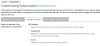
We need to change the page to be displayed when you disable subscriptions.
Substitution in the index file /var/www/vhosts/default/htdocs/index.html I do not give results
I did not understand your question, we pointed out the same thing that you have in the picture, to plan and to make the synchronization subscription. But the standard has remained the same page.

 Facebook
 Twitter