Follow along with the video below to see how to install our site as a web app on your home screen.
Note: This feature may not be available in some browsers.
We value your experience with Plesk during 2025 Plesk strives to perform even better in 2026. To help us improve further, please answer a few questions about your experience with Plesk Obsidian 2025. Please take this short survey: https://survey.webpros.com/
i have a trouble in hosting plesk.my website is work until i wake up this morning and try going it.i cant see anything on my website ,then i log in my hosting to check and see that
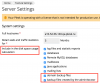
Your disk space may be reached due to following settings:
As you can see, size of created scheduled backup may be calculated and added to disk space usage statistics. Please check it.
Of course, there are maybe another reasons of disk space overusage. Try to find out what's the big size files or directories occurred there and why?
thank u Igor G for your advise.i dont know what happen with my hosting.i try to choose any tab on my hosting but it dont work.and always show second image that i have sent for u.i cant control anything on it.all of this is text.

 Facebook
 Twitter