• We value your experience with Plesk during 2025
    Plesk strives to perform even better in 2026. To help us improve further, please answer a few questions about your experience with Plesk Obsidian 2025.
    Please take this short survey:

    https://survey.webpros.com/

Resolved How to set Sender Name for mails sent via RoundCube

anuanu

New Pleskian
Server operating system version
Ubuntu 22
Plesk version and microupdate number
Obsidian
Hi there,

I have managed to create email addresses ( and corresponding users) and everything is working fine(emails are sent and received) but I have noticed that the name doesn't show up on the recipient side when I send an email from Roundcube webmail. It shows up as undefined.( My recipient was gmail) It seems very unprofessional and untrustworthy. So how do we fix it ?

Thanks!
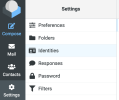
 
In Roundcube: Settings > Identities > Choose identity > Display name

But on recipient side it can also be an issue with their address book.
 
thanks Peter. I tried searching for the setting but can't find Roundcube settings at all.
I searched "Mails" , "Extensions" , "Tools & Settings" in the side menu. Pls can you share how to get to these settings you mentioned earlier ?
 
A follow up, I noticed that roundCube by default allows creating multiple identities. Can that be restricted to only one identity as I wouldn't want my team to create multiple identities and stick to the email that they have been provided. Thanks in advance!
 
You're looking for the $config[‘identities_level’] variable in the Roundcube configuration file /usr/share/psa-roundcube/config/config.inc.php. It can have these values:
  • 0 – many identities, allow edit of all parameters
  • 1 – many identities, allow edit of all parameters, but prohibit editing email address
  • 2 – one identity, allow edit of all parameters
  • 3 – one identity, allow edit lf all parameters, but prohibit editing email address
  • 4 – one identity, allow to edit signature only
Example: Add this line to /usr/share/psa-roundcube/config/config.inc.php
$config['identities_level'] = 2
and save the file. The setting should take effect immediately. No service restart needed.
 
tion file /usr/share/p
You're looking for the $config[‘identities_level’] variable in the Roundcube configuration file /usr/share/psa-roundcube/config/config.inc.php. It can have these values:
  • 0 – many identities, allow edit of all parameters
  • 1 – many identities, allow edit of all parameters, but prohibit editing email address
  • 2 – one identity, allow edit of all parameters
  • 3 – one identity, allow edit lf all parameters, but prohibit editing email address
  • 4 – one identity, allow to edit signature only
Example: Add this line to /usr/share/psa-roundcube/config/config.inc.php
$config['identities_level'] = 2
and save the file. The setting should take effect immediately. No service restart needed.
it worked, Thank you again!
 
Back
Top